AI Agent折腾记(OpenClaw / Hermes Agent)
# 记录在 2 核 4G 云服务器上部署和使用 OpenClaw、Hermes Agent 的过程,以及内存、定时任务和辅助模型计费问题。
AI 智能体(AI Agent)是一种能够感知环境、进行推理并自主行动以实现特定目标的智能系统。
本文记录我在一台 2 核 4G 云服务器上部署 OpenClaw 和 Hermes Agent 的过程,以及实际遇到的问题。
版本说明
本文命令和现象基于 2026 年 4 月的实际部署环境。两个项目更新较快,当前安装方式请优先参考 OpenClaw Docker 文档和 Hermes Agent 安装文档,本文保留当时的命令用于说明问题复现环境。
两次体验没有做标准化性能测试,下面只是同一台低配服务器上的实际感受:
| 项目 | 本次部署体验 | 实际遇到的问题 |
|---|---|---|
| OpenClaw | Docker 部署,安装微信插件时出现明显内存压力 | 插件安装中断;Gateway 偶发连接失败,Cron 未按时执行 |
| Hermes Agent | Docker 部署,交互响应主观上更快 | 辅助模型默认配置可能调用与主模型不同的收费模型 |
OpenClaw(小龙虾)
What is OpenClaw?
OpenClaw is a self-hosted gateway that connects your favorite chat apps and channel surfaces — built-in channels plus bundled or external channel plugins such as Discord, Google Chat, iMessage, Matrix, Microsoft Teams, Signal, Slack, Telegram, WhatsApp, Zalo, and more — to AI coding agents like Pi. You run a single Gateway process on your own machine (or a server), and it becomes the bridge between your messaging apps and an always-available AI assistant.
安装
本着方便重置环境的想法,当时直接使用 Docker 容器部署。OpenClaw 当前官方 Docker 文档使用 Docker Compose 和安装脚本,下面保留的是我测试时使用的单容器命令:
# 创建根目录
mkdir -p ~/.openclaw

# 启动openclaw容器
docker run -d \
  --name openclaw \
  --restart unless-stopped \
  --memory="3g" \
  --memory-swap="6g" \
  --memory-reservation="1g" \
  --shm-size="2gb" \
  -e TZ=Asia/Shanghai \
  -v ~/.openclaw:/home/node/.openclaw \
  -p 3000:3000 \
  ghcr.io/openclaw/openclaw:latest

# 进行openclaw配置
docker exec -it openclaw openclaw onboard

# 安装微信插件
docker exec -it -u node openclaw npx -y @tencent-weixin/openclaw-weixin-cli@latest install
问题
- 安装微信插件失败,到最后一步输出二维码时中断退出。
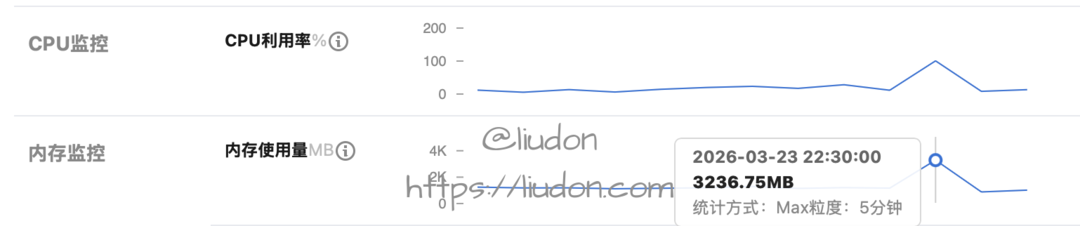
查看机器监控,看到内存基本满了。
我这是一台Lighthouse主机,2核4G,配置较低。
结合监控中的内存占用,我为机器增加了 Swap,避免安装过程再次因可用内存不足而中断。
# 1. 创建一个 2GB 的交换文件 (可以根据需要把 2G 改为 4G)
sudo fallocate -l 2G /swapfile

# 2. 设置正确的权限(仅 root 可读写,出于安全考虑)
sudo chmod 600 /swapfile

# 3. 将文件格式化为交换分区
sudo mkswap /swapfile

# 4. 启用交换文件
sudo swapon /swapfile

# 5. 验证是否成功
sudo swapon --show

# 6. 设置开机自动挂载
echo '/swapfile none swap sw 0 0' | sudo tee -a /etc/fstab
- 配置cron任务,经常无法按时执行。
gateway connect failed: Error: gateway closed (1000):
◇
Gateway not reachable. Is it running and accessible?
Gateway target: ws://127.0.0.1:18789
Source: local loopback
Config: /home/node/.openclaw/openclaw.json
Bind: loopback
检查发现有时gateway会连接失败,这个问题时好时坏,怀疑可能还是机器配置较低引起的。
Hermes Agent
What is Hermes Agent?
It’s not a coding copilot tethered to an IDE or a chatbot wrapper around a single API. It’s an autonomous agent that gets more capable the longer it runs. It lives wherever you put it — a $5 VPS, a GPU cluster, or serverless infrastructure (Daytona, Modal) that costs nearly nothing when idle. Talk to it from Telegram while it works on a cloud VM you never SSH into yourself. It’s not tied to your laptop.
在这台 2 核 4G 服务器上的实际使用中,Hermes Agent 的运行体感更轻一些。
安装
当时依旧使用 Docker 部署。Hermes Agent 当前官方文档推荐使用安装脚本,下面是本文测试时的容器命令:
curl -fsSL https://hermes-agent.nousresearch.com/install.sh | bash
如果要复现本文的 Docker 环境,可以继续使用下面的命令,但参数应以当前项目文档为准。
# 创建根目录
mkdir -p ~/.hermes

# 启动容器,配置模型/消息通道
docker run -it --rm \
  -v ~/.hermes:/opt/data \
  nousresearch/hermes-agent setup

# 启动gateway
docker run -d \
  --name hermes \
  --restart unless-stopped \
  -v ~/.hermes:/opt/data \
  nousresearch/hermes-agent gateway run
模型我选择了OpenRouter,输入API Key,选择nvidia/nemotron-3-super-120b-a12b:free免费模型。
消息通道选择weixin,模式选择pairing,扫描二维码进行绑定。
启动gateway后,微信Clawbot会收到一个配对消息,类似如下:
Hi~ I don't recognize you yet!

Here's your pairing code: `RLU2WUYX`

Ask the bot owner to run:
`hermes pairing approve weixin RLU2WUYX`
进入hermes镜像里执行最后这个命令,之后就可以通过微信Clawbot控制了。
问题

我配置的是免费模型,但是看OpenRouter的Logs,时不时会有Gemini 3 Flash Preview模型的调用,产生费用。
通过走读代码,终于发现问题所在了,hermes agent有主模型和辅助模型两类。
Hermes uses lightweight “auxiliary” models for side tasks like image analysis, web page summarization, and browser screenshot analysis. By default, these use Gemini Flash via auto-detection — you don’t need to configure anything.
这里以vision图像识别举例:
config.yaml文件里vision配置默认如下,provider为auto:
auxiliary:
  # Image analysis (vision_analyze tool + browser screenshots)
  vision:
    provider: "auto"           # "auto", "openrouter", "nous", "codex", "main", etc.
    model: ""                  # e.g. "openai/gpt-4o", "google/gemini-2.5-flash"
    base_url: ""               # Custom OpenAI-compatible endpoint (overrides provider)
    api_key: ""                # API key for base_url (falls back to OPENAI_API_KEY)
    timeout: 120               # seconds — LLM API call timeout; vision payloads need generous timeout
    download_timeout: 30       # seconds — image HTTP download; increase for slow connections
工具入口文件,tools/vision_tools.py
def _handle_vision_analyze(args: Dict[str, Any], **kw: Any) -> Awaitable[str]:
    image_url = args.get("image_url", "")
    question = args.get("question", "")
    full_prompt = (
        "Fully describe and explain everything about this image, then answer the "
        f"following question:\n\n{question}"
    )
    // 从env文件获取vision模型
    model = os.getenv("AUXILIARY_VISION_MODEL", "").strip() or None
    return vision_analyze_tool(image_url, full_prompt, model)

// 注册工具
registry.register(
    name="vision_analyze",
    toolset="vision",
    schema=VISION_ANALYZE_SCHEMA,
    handler=_handle_vision_analyze,
    check_fn=check_vision_requirements,
    is_async=True,
    emoji="👁️",
)
通过registry.register注册vision_analyze工具,处理逻辑在_handle_vision_analyze方法,从env文件里获取AUXILIARY_VISION_MODEL变量值作为vision模型,最终调用vision_analyze_tool方法。
    """
    Analyze an image from a URL or local file path using vision AI.

    This tool accepts either an HTTP/HTTPS URL or a local file path. For URLs,
    it downloads the image first. In both cases, the image is converted to base64
    and processed using Gemini 3 Flash Preview via OpenRouter API.

    The user_prompt parameter is expected to be pre-formatted by the calling
    function (typically model_tools.py) to include both full description
    requests and specific questions.

    Args:
        image_url (str): The URL or local file path of the image to analyze.
                         Accepts http://, https:// URLs or absolute/relative file paths.
        user_prompt (str): The pre-formatted prompt for the vision model
        model (str): The vision model to use (default: google/gemini-3-flash-preview)

    Returns:
        str: JSON string containing the analysis results with the following structure:
             {
                 "success": bool,
                 "analysis": str (defaults to error message if None)
             }

    Raises:
        Exception: If download fails, analysis fails, or API key is not set

    Note:
        - For URLs, temporary images are stored in ./temp_vision_images/ and cleaned up
        - For local file paths, the file is used directly and NOT deleted
        - Supports common image formats (JPEG, PNG, GIF, WebP, etc.)
    """
根据vision_analyze_tool方法参数说明,model默认为google/gemini-3-flash-preview。
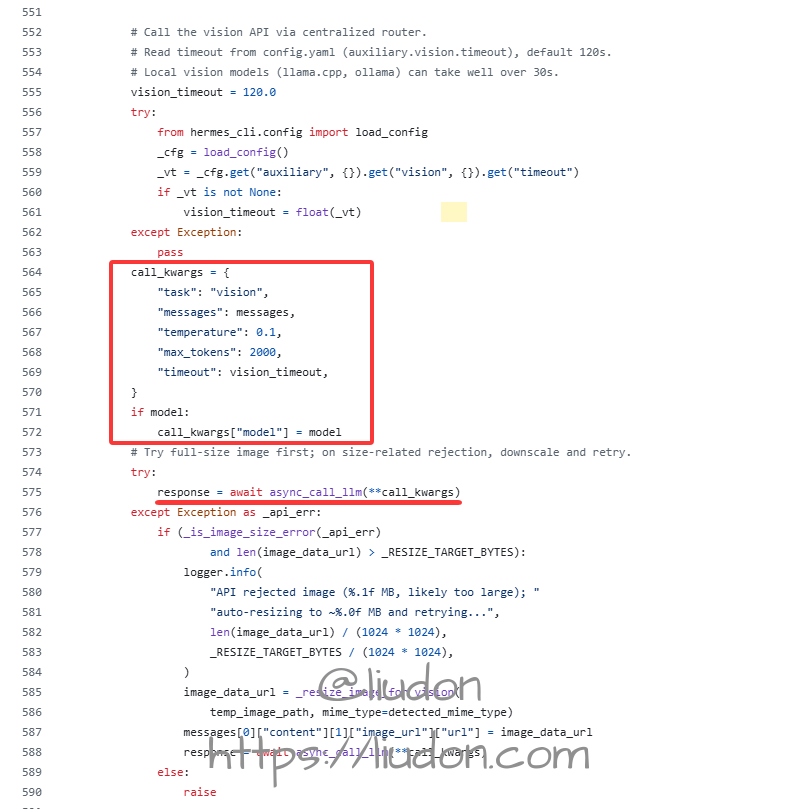
env文件指定了模型的话,使用指定的模型,调用了async_call_llm方法。
注意,这里没有指定provider参数。
async_call_llm方法如下:
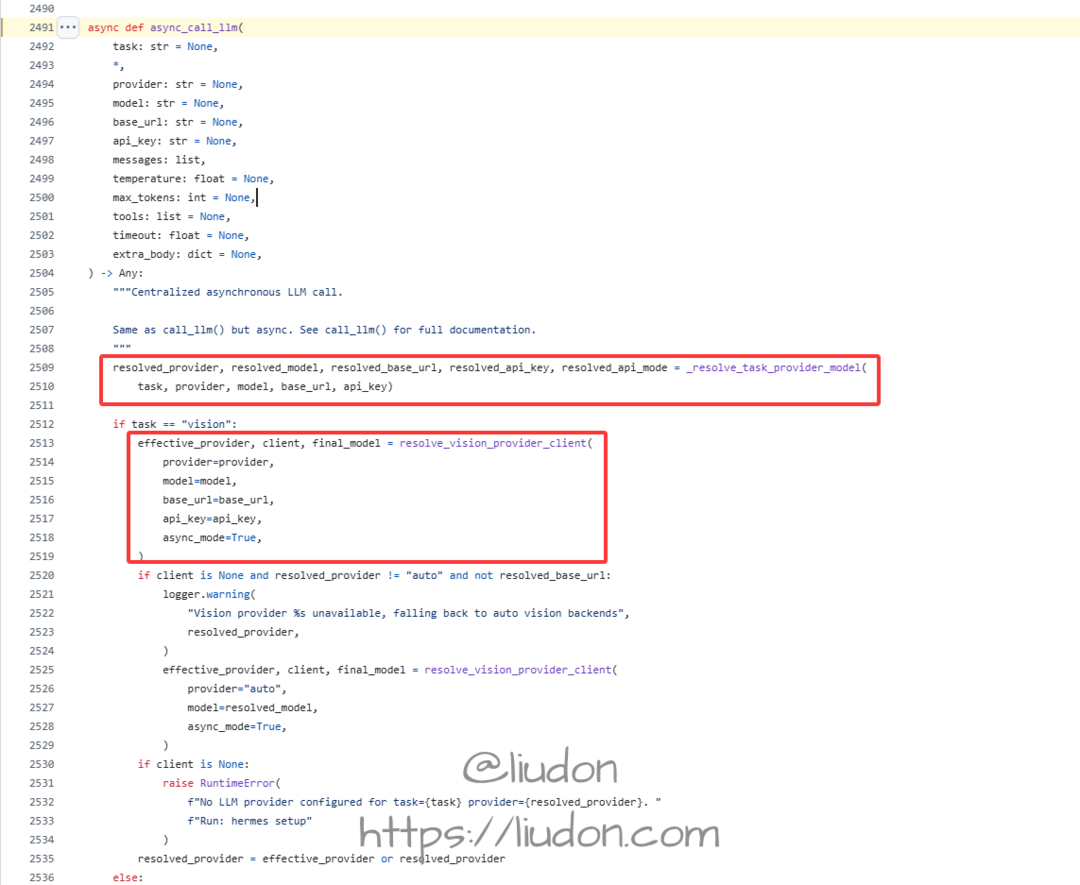
先看_resolve_task_provider_model方法实现。
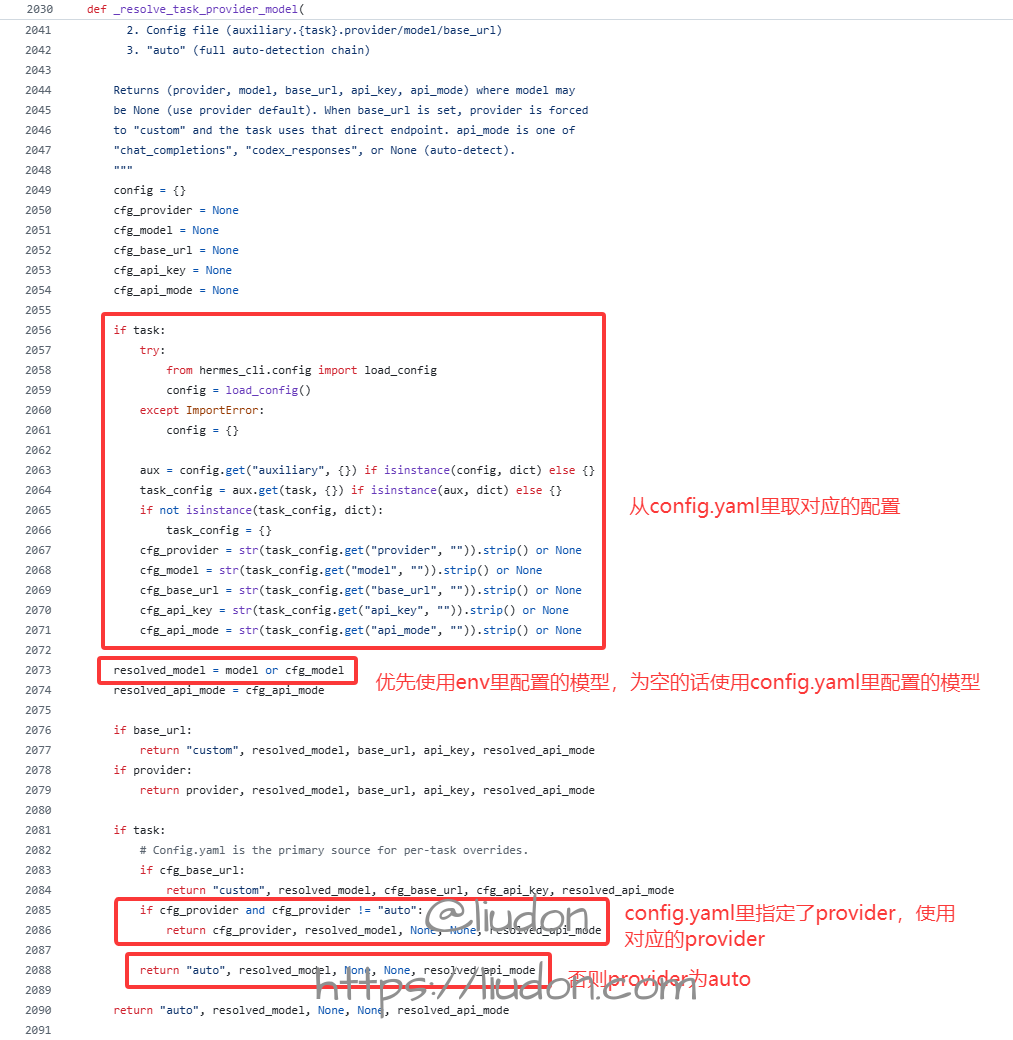
指定了task的情况,会从config.yaml里读取对应的配置,模型会优先使用env文件的配置,为空的话使用config.yaml文件里的配置。
如果config.yaml里指定了provider,则使用对应的provider,否则返回auto。
再来看resolve_vision_provider_client方法实现。
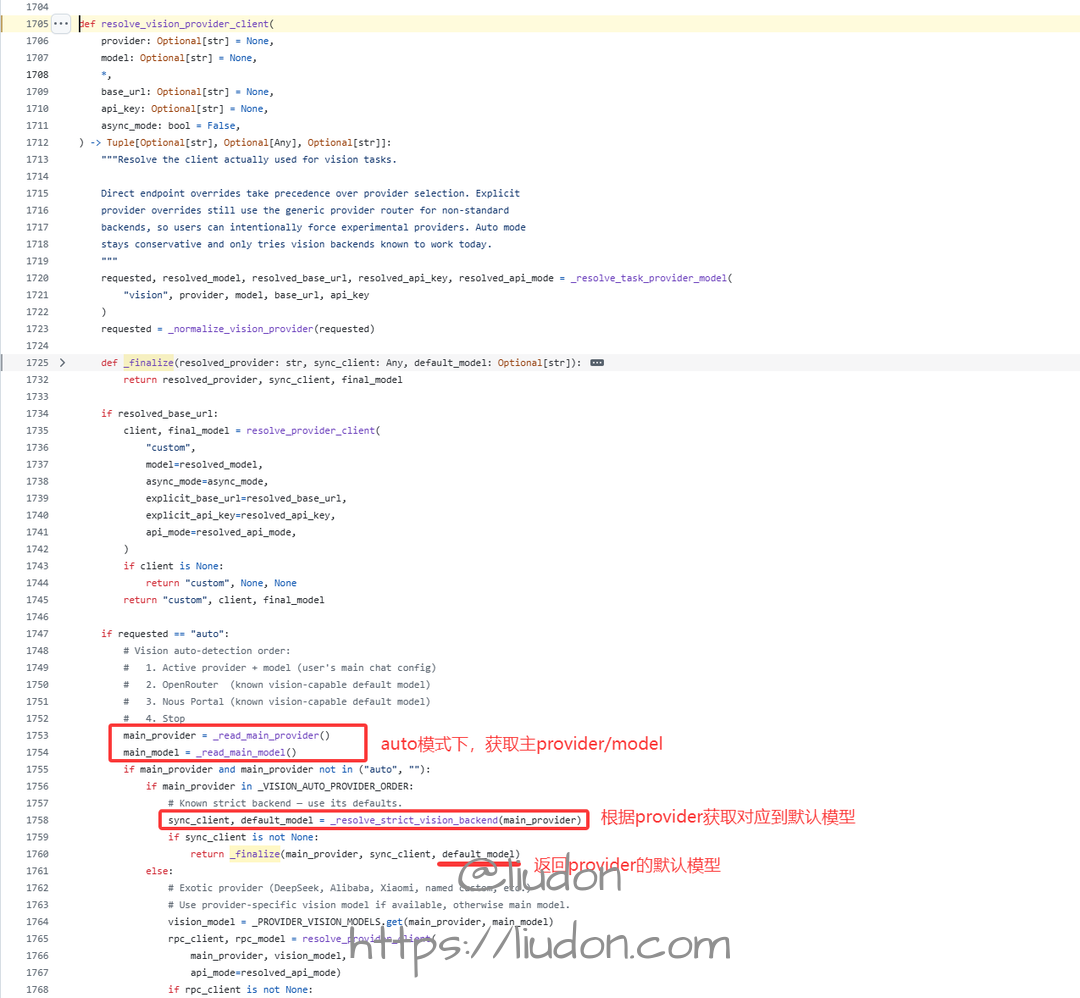
_read_main_provider/_read_main_model为读取config.yaml里配置。
def _read_main_model() -> str:
    """Read the user's configured main model from config.yaml.

    config.yaml model.default is the single source of truth for the active
    model. Environment variables are no longer consulted.
    """
    try:
        from hermes_cli.config import load_config
        cfg = load_config()
        model_cfg = cfg.get("model", {})
        if isinstance(model_cfg, str) and model_cfg.strip():
            return model_cfg.strip()
        if isinstance(model_cfg, dict):
            default = model_cfg.get("default", "")
            if isinstance(default, str) and default.strip():
                return default.strip()
    except Exception:
        pass
    return ""


def _read_main_provider() -> str:
    """Read the user's configured main provider from config.yaml.

    Returns the lowercase provider id (e.g. "alibaba", "openrouter") or ""
    if not configured.
    """
    try:
        from hermes_cli.config import load_config
        cfg = load_config()
        model_cfg = cfg.get("model", {})
        if isinstance(model_cfg, dict):
            provider = model_cfg.get("provider", "")
            if isinstance(provider, str) and provider.strip():
                return provider.strip().lower()
    except Exception:
        pass
    return ""
_VISION_AUTO_PROVIDER_ORDER = (
    "openrouter",
    "nous",
)
auto模式会依次尝试openrouter和nous两个提供商。
查看_resolve_strict_vision_backend方法实现:
def _resolve_strict_vision_backend(provider: str) -> Tuple[Optional[Any], Optional[str]]:
    provider = _normalize_vision_provider(provider)
    if provider == "openrouter":
        return _try_openrouter()
    if provider == "nous":
        return _try_nous(vision=True)
    if provider == "openai-codex":
        return _try_codex()
    if provider == "anthropic":
        return _try_anthropic()
    if provider == "custom":
        return _try_custom_endpoint()
    return None, None
我配置的是openrouter,查看_try_openrouter方法实现。
def _try_openrouter() -> Tuple[Optional[OpenAI], Optional[str]]:
    pool_present, entry = _select_pool_entry("openrouter")
    if pool_present:
        or_key = _pool_runtime_api_key(entry)
        if not or_key:
            return None, None
        base_url = _pool_runtime_base_url(entry, OPENROUTER_BASE_URL) or OPENROUTER_BASE_URL
        logger.debug("Auxiliary client: OpenRouter via pool")
        return OpenAI(api_key=or_key, base_url=base_url,
                       default_headers=_OR_HEADERS), _OPENROUTER_MODEL

    or_key = os.getenv("OPENROUTER_API_KEY")
    if not or_key:
        return None, None
    logger.debug("Auxiliary client: OpenRouter")
    return OpenAI(api_key=or_key, base_url=OPENROUTER_BASE_URL,
                   default_headers=_OR_HEADERS), _OPENROUTER_MODEL
注意这里调用接口时传入的model为**_OPENROUTER_MODEL**常量。
# Default auxiliary models per provider
_OPENROUTER_MODEL = "google/gemini-3-flash-preview"
_NOUS_MODEL = "google/gemini-3-flash-preview"
_NOUS_FREE_TIER_VISION_MODEL = "xiaomi/mimo-v2-omni"
_NOUS_FREE_TIER_AUX_MODEL = "xiaomi/mimo-v2-pro"
_NOUS_DEFAULT_BASE_URL = "https://inference-api.nousresearch.com/v1"
_ANTHROPIC_DEFAULT_BASE_URL = "https://api.anthropic.com"
_AUTH_JSON_PATH = get_hermes_home() / "auth.json"
auto模式下,不指定model的情况下,主provider为openrouter时,使用的是google/gemini-3-flash-preview模型,这就是为什么配置的免费模型,但仍产生了google/gemini-3-flash-preview收费模型的调用。
将配置里的provider: "auto"改为provider: "main",使辅助模型也走主模型配置。
总结
在这台 2 核 4G 服务器上,Hermes Agent 的响应体感更快,占用资源也更适合我的环境。这个结论来自个人使用体验,不是标准化性能测试。
把 OpenClaw 的 Cron 任务迁移到 Hermes Agent 后,我在本文测试期间没有再遇到未执行的问题。